
To add an external account
- Log into the mobile app*
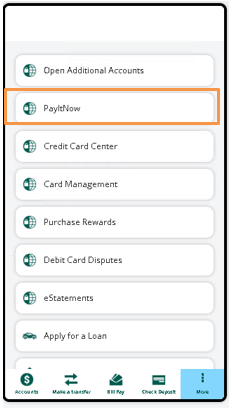
- Click “More”
- Select “PayItNow”
*If using online banking, choose “Move Money” then “PayItNow”
4. Navigate to External Account and click “Add”

5. Search and select a financial institution where you have an account
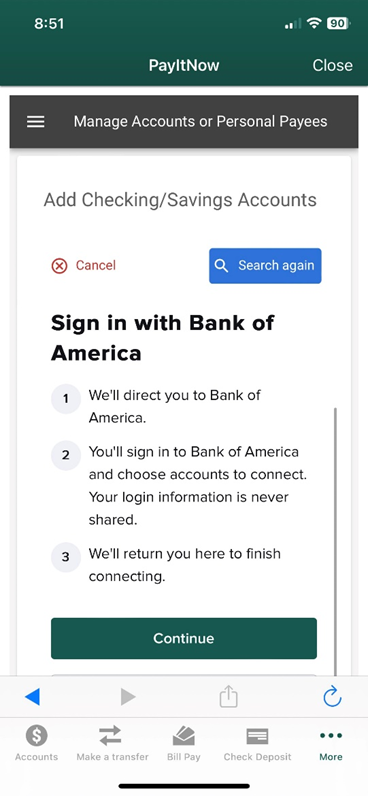
6. Click Continue, then verify your account using your username and password for that external account

7. Hit “Submit” and the account is added immediately
To add a person/recipient
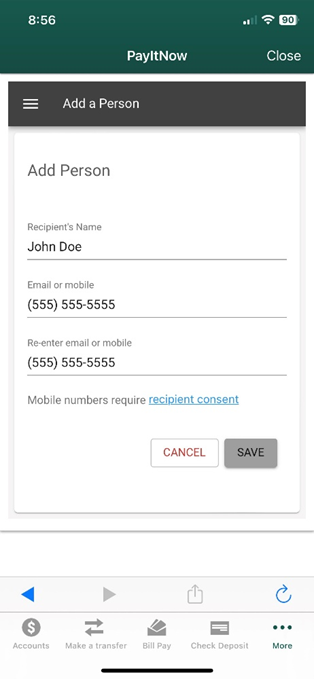
- From the PayItNow home screen, navigate to People and click “Add”

2. Enter the person’s name AND either their cell phone number OR email address, then click “Save”
Send a Transfer or Payment
Please note: Savings accounts are NOT eligible for PayItNow transfers. To use funds from your savings account, you must first transfer those funds from your TCU savings account to your TCU checking account, then complete the PayItNow transaction.
- In PayItNow, click the menu on the left and select “Transfer/Send Money”
- Click the dropdown menu in the “To” field and select the destination
- Select TCU account to transfer INBOUND
- Select External Account to send OUTBOUND
- Select Person to send a person-to-person payment
- Click the dropdown menu in the “From” field to select the originating account
- Select your Triangle Account to send funds via ACH (2-day)
- Select a Debit Card* for person-to-person payments (real-time)
*If using a Debit Card, you will need to verify the card CVV each time you send a payment for added security
4. Enter the transfer amount and complete the payment options, including send date, frequency, alerts, and personal message
5. Click “Send”
6. The recipient will receive notification that a payment is pending and you will receive an email confirmation