

For a comprehensive list of what to expect, please read our Special Edition of MoneyTalk:
Service Availability During Upgrade Weekend
While our banking upgrade is taking place, many of our systems and services will be unavailable. Below is the timeline that will help you plan to avoid any inconveniences. We will begin the upgrade at the close of business on Thursday, April 30, 2026, and anticipate completion by end of day Monday, May 4, 2026, opening our branches again on Tuesday, May 5, 2026. All deposits and withdrawals will be processed once the system is brought online.
FOR QUICKBOOKS USERS: To ensure your data connectivity transfers smoothly to the new system, QuickBooks users will need to modify their QuickBooks settings by Thursday, April 30, 2026. CLICK HERE to find instructions for both Windows and Mac operating systems, and both connectivity types (Direct Connect and Web Connect).
SERVICES CURRENTLY UNAVAILABLE
This list will be updated as services become unavailable. Continue to check back for the most up-to-date information.
Services/Features Unavailable 4/28/2026
– Digital Banking: New User Enrollment
– Digital Banking: New Scheduled Transfers
– Digital Banking: Widgets for MX Money Management within digital banking
– Digital Banking: Alerts/Notifications
Services/Features Unavailable 4/29/2026
– Instant Issue or Mail Order Plastic Cards
– Card Pin Changes
– Digital Banking: Bill Pay Access
Services/Features Unavailable 4/30/2026
– Outgoing Wires
– Debit Cards in stand-in mode
– All online services unavailable at 6 PM EST
– Shared branching unavailable at 6 PM EST
– Incoming wires processed until 6 PM EST
– All branches closing at 6 PM EST and reopening May 5, 2026

Click here to download a PDF of the above schedule.
What WILL Change After Upgrade Weekend
- Accounts Will Be Known as Shares: Our new system will refer to deposit products under an account as “Shares.”
- Share Suffixes: The suffix (the digits that identify your deposit products) will change from 2-digits to 4-digits. For example: Savings Shares will change from REGULAR SHARE-01 to REGULAR SHARE-0001.
Additionally, every deposit share type will have access to an ACH number. The suffix (the digits that identify your loan products) will change from 3-digits to 4-digits.
For example: Loan Suffixes will change from PERSONAL LOAN-143 to PERSONAL LOAN-0143. - Share Nicknames: If you have set up a share nickname in one of our branches, share nicknames will be converted back to the standard system share type. However, nicknames created in digital banking or your mobile app will remain there. Nicknames will move over both in the core and onlines although they may not match depending on how you set them up.
- TARA Phone Banking: We are upgrading TARA (Telephone Audio Response Assistant) to iTalk, our newly improved phone banking system. The iTalk system will have a new phone number, 800-789-8272, available starting May 4, 2026. During your first call to iTalk, you will be prompted to set up a new phone banking pin which will be used to identify you during future iTalk calls. Please be aware that menu options and our system voice will change.
What WILL NOT Change After Upgrade Weekend
- Rates: The current rates on your shares (deposits and loans) will NOT change as a result of the conversion.
- Balances: Your account balances will NOT change because of the upgrade unless you make normal transactions such as deposits, withdrawals, payments, transfers, or advances.
- Payment Due Dates: Unless we advise you otherwise, the payment due dates on your loans will NOT change.
- Certificate Maturity Dates: Maturity dates on your certificate accounts will NOT change.
- Direct Deposits: If you have direct deposits, they will NOT change.
- Plastic Cards: You CAN continue to use your current Credit Cards and Debit Cards. Any current PINs will NOT change.
- Online and Mobile Banking: Your User Name and Password will remain the same.
Your Success During Conversion Weekend – Checklist
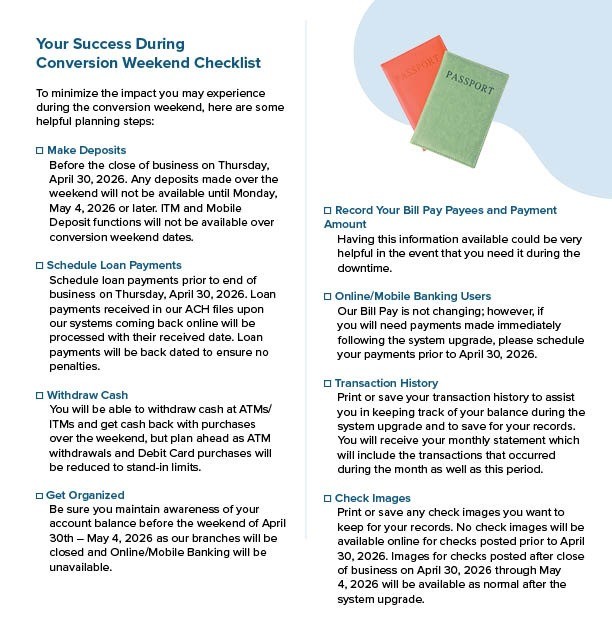
Click here to download a PDF of the conversion checklist.